> ## Documentation Index
> Fetch the complete documentation index at: https://densify-sync-changelog-1.mintlify.site/llms.txt
> Use this file to discover all available pages before exploring further.

# Browser Requirements

Refer to the following table for the browser requirements for each of Densify's components/consoles.

Table: Supported Browsers

<table style={{ width: "100%", borderCollapse: "collapse" }}>
  <colgroup>
    <col style={{ width: "105px" }} />

    <col style={{ width: "468px" }} />
  </colgroup>

  <tbody>
    <tr>
      <td style={{ verticalAlign: "top", textAlign: "center", fontWeight: "bold", backgroundColor: '#003660', color: "white" }}>
        Analysis Console>
      </td>

      <td style={{ verticalAlign: "middle", textAlign: "left" }}>
        <ul style={{ paddingLeft: "20px", margin: "0" }}>
          <li>Internet Explorer using Microsoft Edge's IE mode.</li>
        </ul>

        <p>
          <Note>
            Other versions of Internet Explorer, and other browsers
            such as Firefox and Chrome are not supported.
          </Note>
        </p>
      </td>
    </tr>

    <tr>
      <td style={{ verticalAlign: "top", textAlign: "center", fontWeight: "bold", backgroundColor: '#003660', color: "white" }}>
        Kubex Console
      </td>

      <td style={{ verticalAlign: "middle", textAlign: "left" }}>
        <div>
          <p>
            For the <b>Densify Console</b>, the following browsers have been
            certified:
          </p>

          <ul style={{ paddingLeft: "20px", margin: "0" }}>
            <li>Google Chrome™ 131.0.6778.86 or later</li>

            <li>
              Microsoft Edge™ 131.0.2903.70 or later

              <p>
                There is a known issue when using Safari on MacOS v13.3.1. The
                Kubex UI does not load and an error is displayed when trying to
                login to Kubex when using this version of Safari. As a workaround,
                use a supported version of Chrome or Edge.
              </p>
            </li>
          </ul>

          <p>Also note the following information:</p>

          <p>
            <b>Clearing the Browser Cache</b> — After any Kubex upgrade, you
            must clear your browser cache before re-opening the Kubex Console.
          </p>

          <p>
            <b>Optimized Browser</b> — The Kubex Console has been optimized
            for Google Chrome and Microsoft Edge. These browsers are highly
            recommended for the richest user experience.
          </p>

          <p>
            <b>Secured Connection</b> — If you are using an HTTPS connection,
            ensure your Kubex URL has been added as a trusted site and the
            security level is defined as "Medium" or "Medium High".
          </p>

          <p>
            <b>Compatibility Message</b> — When your browser version differs
            from the above-listed browsers, a confirmation message is displayed.
            Kubex highly recommends that you use one of the certified browser
            versions for optimal display and end-user experience.
          </p>

          <p>
            <b>Monitor Resolution</b> — You require a monitor/video card
            combination that can support 1920 x 1080 dpi for optimal viewing of
            the Kubex Console. When viewing the Analysis Console, set your
            resolution to a minimum of 1024 x 768.
          </p>

          <p>
            <b>Browser Zoom Setting</b> — Ensure your browser is at 100% zoom.
          </p>
        </div>
      </td>
    </tr>
  </tbody>
</table>

Additionally, refer the [Product Support Policy](/images/docs/WebHelp_Densify_Cloud/Content/Resources/PDFs/Densify-Product-Support-Policy.pdf) for changes to the list of supported browsers and browser features.

## Browser Locale Settings

The format of the date information that is appended to downloaded files uses the date format of your browser's locale setting. Some countries display the date as month-day-year, while others use day-month-year or year-month-day. Refer to your browser for details on determining the locale or changing the date format.

## Navigation Considerations when using Safari on a MAC

Safari users viewing Kubex from an Apple device will notice the scroll bars may not be displayed consistently on all consoles and dashboards.

In general, there are a few ways to scroll up/down and right/left in Safari:

* If the scroll bars are not visible on the right or bottom of the page you can left-click on empty space or drag the bar with the left-click.
* If the scroll bars are not displayed you can only use the mouse's scrolling wheel or touchpad, if available.

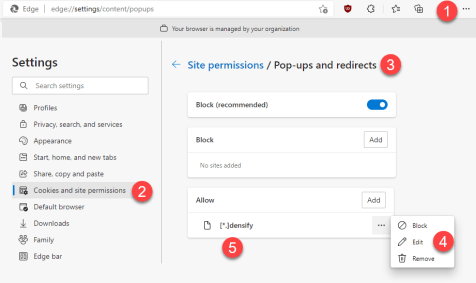
## Enabling Kubex Popups

If you encounter any issues with popup login window, dialog boxes or other informational windows, you can enable permission for Kubex popups:

1. From Microsoft Edge, expand the settings dropdown menu.
2. Navigate to **Settings > Cookies and site permissions**. Contact your system administrator if you cannot access these options.
3. In the **Site Permissions** list, scroll down to locate **Pop-ups and redirects** and set this to "Allow": This setting allows the Analysis Console to be reloaded in Internet Explorer mode.
4. Expand the ... options and select **Edit**.
5. Enter the following \[\*.]densify and click **Add**

<Accordion title="Enabling Kubex Pop-Ups">
  <Frame>
    <img src="https://mintcdn.com/densify-sync-changelog-1/LYezGSKEM7gciwR1/images/docs/WebHelp_Densify_Cloud/Content/Resources/Images/Cirba_SaaS/06000092_476x283.png?fit=max&auto=format&n=LYezGSKEM7gciwR1&q=85&s=5c3e82370a8414d5ccd5a7ef8db74370" alt="" width="476" height="283" data-path="images/docs/WebHelp_Densify_Cloud/Content/Resources/Images/Cirba_SaaS/06000092_476x283.png" />
  </Frame>
</Accordion>

Other Resources

1. [https://docs.microsoft.com/en-us/internet-explorer/ie11-deploy-guide/turn-on-enterprise-mode-and-use-a-site-list](https://docs.microsoft.com/en-us/internet-explorer/ie11-deploy-guide/turn-on-enterprise-mode-and-use-a-site-list)
